How I exposed a TSP solver to AI agents via WebMCP
July 25, 2026
teeline is a browser-based Traveling Salesman Problem solver. Upload a .tsp file, pick from 18 algorithms, get a tour back, all running in-browser via WebAssembly.
A few weeks ago I added a second way to reach it: WebMCP, Chrome’s experimental declarative API for exposing page functionality as tools an AI agent can call directly, no server round-trip and no API key.
This post is a worked example: the actual markup, the actual wiring code, and a real transcript from testing it against Gemini through the WebMCP Inspector extension.
The pitch: tools as hidden forms
WebMCP’s core idea is refreshingly low-tech: a tool is a <form> element with some extra attributes. No RPC framework, no schema file to keep in sync. The form is the schema.
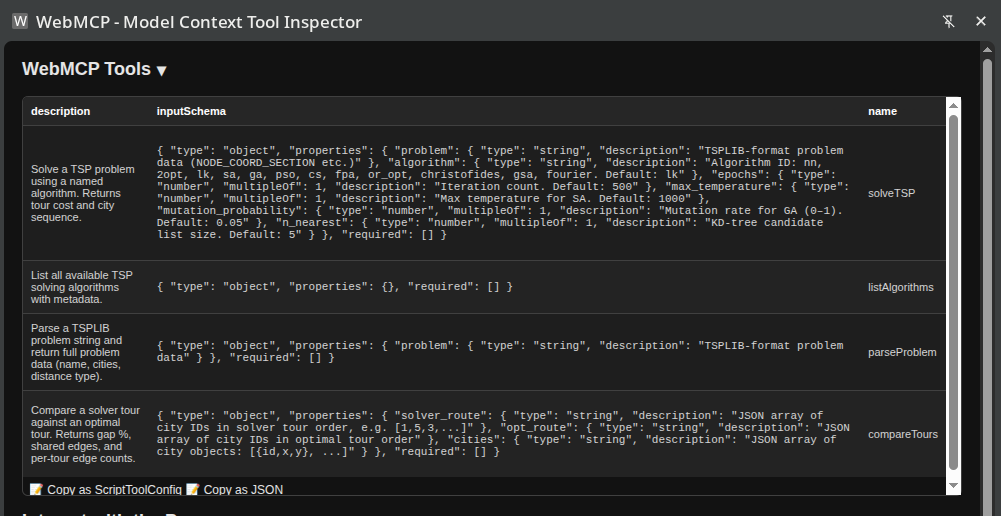
teeline exposes four: solveTSP, listAlgorithms, parseProblem, and compareTours. Here’s the solver one, straight from index.astro:
<form id="webmcp-solve" toolname="solveTSP"
      tooldescription="Solve a TSP problem using a named algorithm. Returns tour cost and city sequence."
      toolautosubmit hidden>
  <textarea name="problem" toolparamdescription="TSPLIB-format problem data (NODE_COORD_SECTION etc.)"></textarea>
  <input name="algorithm" type="text"
         toolparamdescription="Algorithm ID: nn, 2opt, lk, sa, ga, pso, cs, fpa, or_opt, christofides, gsa, fourier. Default: lk">
  <input name="epochs" type="number" toolparamdescription="Iteration count. Default: 500">
  <input name="max_temperature" type="number" toolparamdescription="Max temperature for SA. Default: 1000">
  <input name="mutation_probability" type="number" toolparamdescription="Mutation rate for GA (0–1). Default: 0.05">
  <input name="n_nearest" type="number" toolparamdescription="KD-tree candidate list size. Default: 5">
</form>
toolname and tooldescription are what an agent sees as the tool’s identity. Every toolparamdescription on an input becomes that parameter’s description in the tool’s schema. hidden keeps it out of the human UI; this markup exists purely for agents to discover.
One important constraint: these forms have to live in the page’s static, unhydrated HTML. If a build tool ever wraps them inside a client-side-rendered island, WebMCP’s feature detection (which parses the initial DOM, not whatever renders after hydration) won’t see them at all.
Wiring a submission to an answer
A hidden form is just markup until something answers the submit event. teeline’s solver already runs off the main thread in a Web Worker (WASM doesn’t block), so the wiring is mostly “translate a form submission into a worker message, translate the worker’s reply into a resolved promise”:
function wireSolveTSP(worker: Worker): void {
  const form = document.getElementById('webmcp-solve') as HTMLFormElement | null
  if (!form) return
  form.addEventListener('submit', (e) => {
    const ae = e as AgentSubmitEvent
    if (typeof ae.respondWith !== 'function') return
    e.preventDefault()
    ae.respondWith(new Promise((resolve, reject) => {
      const data = new FormData(form)
      const id = crypto.randomUUID()
      // ...read algorithm/epochs/etc from FormData into options...

      const handler = (msg: MessageEvent) => {
        const res = msg.data as WebMCPSolveResult
        if (res.type !== 'webmcp-result' || res.id !== id) return
        worker.removeEventListener('message', handler)
        if (res.error) reject(new Error(res.error))
        else resolve(res.solution)
      }
      worker.addEventListener('message', handler)
      worker.postMessage({ type: 'webmcp-solve', id, solver: data.get('algorithm') ?? 'lk', input: data.get('problem'), options })
    }))
  })
}
The agentInvoked/respondWith() pair is the actual WebMCP contract: when an agent submits the form, Chrome sets agentInvoked: true and gives the event a respondWith(promise) method. Whatever that promise resolves to goes back to the agent as the tool’s result; a rejection becomes a tool error.
That typeof ae.respondWith !== 'function' check is doing more than satisfying TypeScript. A regular human submit event has no respondWith method, so the handler returns before it ever calls e.preventDefault(), leaving normal form handling untouched. Skip that check and this pattern breaks the moment it’s reused on a form humans can actually see and submit: a human click would get hijacked into the agent-only worker path, preventDefault() would stop the page from doing anything visible, and the eventual result would only ever reach an agent that isn’t there. The guard is what makes one handler safe for both submission paths.
Everything else here (crypto.randomUUID() as a correlation id, a one-shot message listener matched by that id) is just “how do I turn a single-shot worker round-trip into a promise,” the same pattern you’d use for any other async bridge.
Testing it against a real agent
I installed the WebMCP Inspector extension and pointed it at the solver page. It immediately discovered all four tools, straight off the hidden-form markup:
Then I gave it a Gemini key and asked it this, on the actual solver page:
I’m planning a tour through Southern Germany using only my Deutschlandticket (regional trains only). I’d like to visit these 8 cities: München, Augsburg, Nürnberg, Regensburg, Würzburg, Ulm, Stuttgart, and Heidelberg. Work out their approximate coordinates, list the available algorithms, solve it with a fast heuristic, then solve it exactly, and compare the two.
Gemini started with listAlgorithms, then worked out coordinates for all 8 cities on its own. No geocoding tool involved, just its own knowledge:
| City | Latitude | Longitude |
|---|---|---|
| München | 48.1351 | 11.5820 |
| Augsburg | 48.3705 | 10.8978 |
| Nürnberg | 49.4521 | 11.0767 |
| Regensburg | 49.0134 | 12.1016 |
| Würzburg | 49.7913 | 9.9534 |
| Ulm | 48.3996 | 9.9916 |
| Stuttgart | 48.7758 | 9.1829 |
| Heidelberg | 49.3988 | 8.6724 |
It plugged those straight in as x/y in an EUC_2D TSPLIB problem, which is worth pausing on. A degree of longitude and a degree of latitude aren’t the same real-world distance, so treating raw coordinates as flat Euclidean space distorts the geometry. Gemini seemed to know this too. Its final answer labeled the tour cost “7.976 (coordinate units)” rather than claiming it was kilometers. Over a region this compact, all 8 cities sit within roughly 300km of each other, the distortion doesn’t wreck the result: the route it found still traces a sane, non-crossing loop through all 8 cities on a real map.
Gemini then called solveTSP twice at once: nn and bhk, the exact solver, feasible here since teeline only recommends it up to about 20 cities. Both came back clean.
// solveTSP (algorithm: nn)
{"total":7.976102828979492,"route":[1,2,6,7,8,5,3,4]}

// solveTSP (algorithm: bhk, exact)
{"total":7.976102828979492,"route":[8,5,3,4,1,2,6,7]}
Same cost, both times. compareTours confirmed why:
{"optimalCost":7.976102828979492,"solverCost":7.976102828979492,"gapPct":0,"sharedEdges":8,"solverOnlyEdges":0,"optimalOnlyEdges":0}Nearest-neighbor found the actual optimal tour. All 8 edges match the exact solve. That’s not something to expect in general: for most city layouts, nearest-neighbor lands on a noticeably worse tour than the exact solution. It works out here because these 8 cities roughly form a single natural loop with no city badly out of the way.
Gemini’s final answer folded everything into an itinerary: München → Augsburg → Ulm → Stuttgart → Heidelberg → Würzburg → Nürnberg → Regensburg → back to München, plus estimated regional-train travel times per leg. Those time estimates are Gemini’s own general knowledge about the German rail network, not something teeline computed. teeline only ever saw x/y coordinates and Euclidean distance.
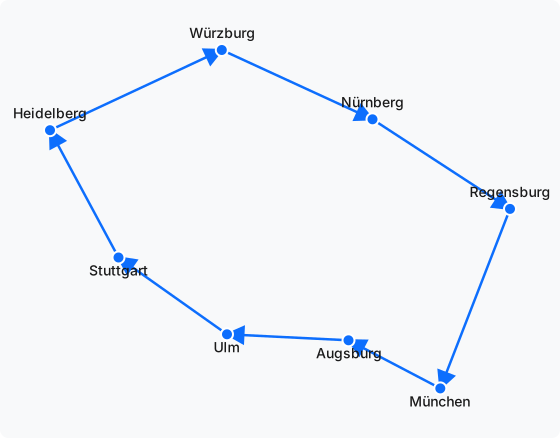
Worth being clear about what this line actually represents: it’s the shortest closed loop connecting all 8 points as the crow flies, not a real train route. Rail lines follow existing track, not straight lines between cities, and actual travel time depends on transfers and timetables, not distance. Treat this as a sensible order to visit the cities in, not a routing engine.
If you’d rather reach teeline from inside Claude instead of a browser extension, there’s also a native MCP path via Wassette: same solver, different transport.
Try it yourself
You’ll need Chrome ≥ 149 (check chrome://version) and the #enable-webmcp-testing flag enabled, plus the WebMCP Inspector extension. Full setup steps, including Google’s official getting-started guide for connecting your own agent, are on the AI agent access page. Once you’re connected, point your agent at tspsolver.com and ask it to solve something. The four tools above are all it needs.